BlueDriver OBD2 Scan Tool
- 3.5
- Rating
- 1.00M
- Installs
- Free
- Price
 Analysis by App-foxy
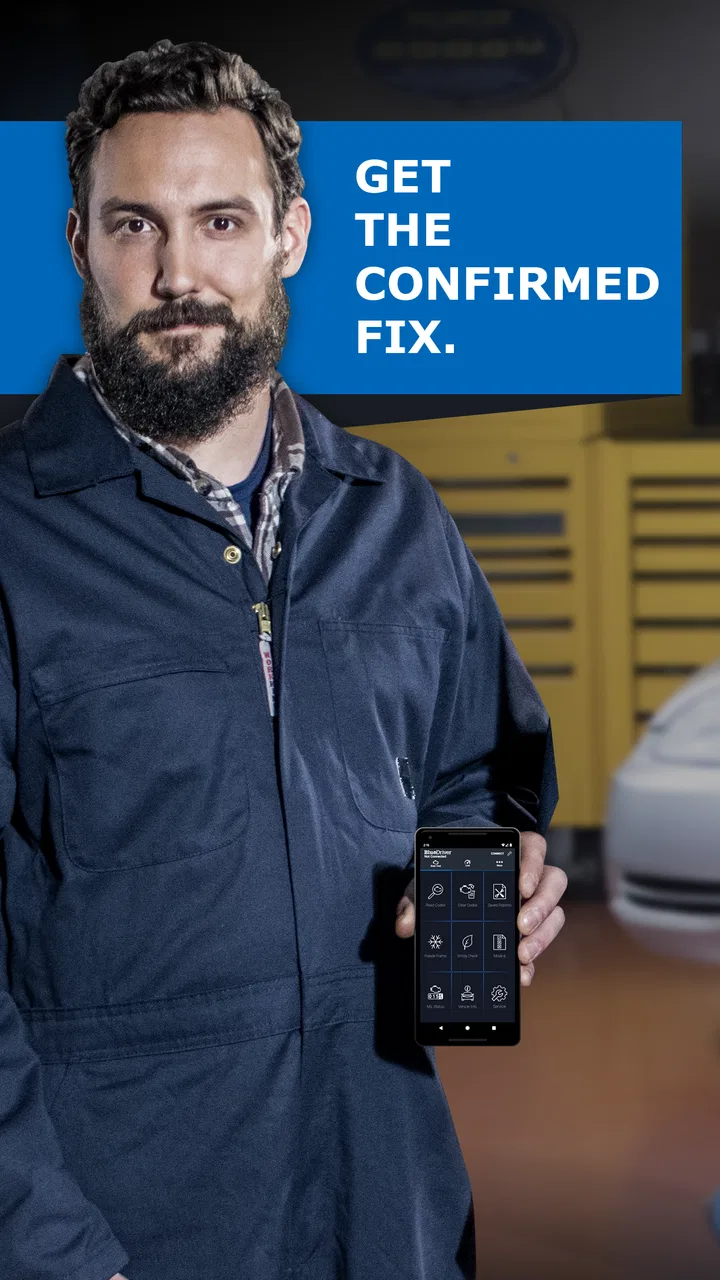
When a warning light appears on the dashboard, most drivers face the same awkward choice: visit a repair shop immediately, or keep driving while wondering whether the problem is minor or urgent. BlueDriver OBD2 Scan Tool is designed to make that first decision less of a guess. It is a free Auto & Vehicles app from Lemur Vehicle Monitors, but the app itself is only one part of the experience; you also need the company’s compatible BlueDriver hardware to read information from a vehicle.
I see it as a practical middle ground between a basic dashboard reader and a professional diagnostic setup. It can help you understand why a warning light appeared, check information before speaking with a mechanic, and keep a record of what happened during a frustrating vehicle problem. It is not a magic repair tool, and it does not turn a phone into a complete workshop scanner. Its value depends heavily on the vehicle, the adapter, the phone connection, and how carefully you interpret the results.
How BlueDriver feels when the phone and car have to work together
The first important point is that this is not a standalone app you open casually on a bus or at home. The useful part begins when the compatible scanner is connected to the vehicle’s OBD2 port and the phone communicates with it. That makes connectivity central to the experience. A good scan feels quick and reassuring; a failed connection can make the whole process feel more complicated than expected.
You May Also Like

 Blood Strike: 2.5 Anniversary
Blood Strike’s Loadouts Turn Every Drop Into a Tactical Gamble
A close look at Blood Strike’s custom loadouts: how fast access to signature weapons reshapes its battle royale rhythm, rewards preparation, and narrows the gap between fights.

 Pandora - Music & Podcasts
Pandora’s Music Is Easy to Start, but Harder to Recover
Pandora’s strength is its low-effort path from a seed to a station. Its weak spot is how much confidence it asks you to place in connection, setup, and quiet recovery.

 8 Ball Pool
 Is Built on Rivalries, Rematches, and Routine
A close look at the rivalries, rematches, shared routines, and unanswered safety questions that turn a quick pool match into a persistent mobile community.

 Samsung Music
’s Quiet Strength Is Playing What You Already Own
Its reach comes less from spectacle than from dependable access to a personal library. That simplicity is both the app’s strongest retention engine and its ceiling.

 AccuWeather: Weather Radar
AccuWeather Review: A Quick, Clear Forecast for Everyday Decisions
For everyday plans, the best forecast is the one you can understand quickly. AccuWeather makes rain timing, radar, and local conditions easy to act on, with a few trade-offs.

 Hill Climb Racing
Why Hill Climb Racing Still Turns Crashes Into One More Run
A tiny car, a bumpy hill and one more upgrade: Hill Climb Racing keeps resurfacing because its simple chaos makes every near-miss feel personal.
More From Our News Desk
View All News


Setup is best approached with patience rather than urgency. I would park safely, switch off distractions, locate the vehicle’s diagnostic port, and make sure the phone has enough battery before starting. If the adapter is not recognized immediately, repeatedly tapping buttons usually helps less than checking the basics: the connector must be seated properly, the vehicle should be in the right ignition state, and the phone must be communicating with the scanner.
This matters because people often install a diagnostic app after seeing a warning light, when they are already anxious. BlueDriver can reduce that uncertainty, but only if the connection is established before the user starts interpreting codes. A disconnected adapter, an ignition left in the wrong position, or a phone with a disrupted wireless connection can look like an app failure even when the real issue is physical setup.
Once the link is working, the app’s main strength is turning technical vehicle information into something a normal driver can use. It is more helpful than simply seeing a short code such as a generic engine fault. The practical question is not only “what code appeared?” but also “what should I do next, and how serious might this be?” BlueDriver is useful because it gives the driver a starting point for that conversation.
What happens when the network is unreliable
Connectivity has more than one layer here. The phone needs to communicate with the scanner, and some parts of the overall experience may also depend on the phone’s normal online access. I would not treat the app as a guaranteed replacement for every internet-based reference or service. If I were checking a warning light in an underground garage, a rural driveway, or a parking area with weak reception, I would avoid assuming that every explanatory detail will behave exactly as it does at home.
That does not make the app useless in a poor-signal location. The vehicle connection and the phone’s internet connection are separate concerns, so a weak mobile signal does not automatically mean the scanner cannot communicate with the car. Still, a cautious user should prepare before leaving a reliable connection. Installing the app in advance, signing in if needed, and familiarizing yourself with the basic workflow can prevent a network problem from becoming a roadside panic.
My practical advice is to scan before clearing anything. If a code appears, save or note the result first, then investigate. Clearing a warning without understanding it can remove useful evidence for a mechanic and make it harder to compare what changed. The convenience of pressing a reset control is not worth losing the diagnostic trail when the vehicle is behaving unpredictably.
A second useful habit is to repeat a scan after a short drive only when the vehicle seems safe to operate. One reading tells you what the car reported at that moment; a later reading can show whether the condition returned. That distinction is valuable when a warning light appears intermittently. It also prevents me from treating one disappearing light as proof that the underlying problem has been fixed.
Using it in real mobile situations
The most believable use case is a normal commute. Imagine the engine warning light comes on while you are away from home. You pull into a safe parking space, connect the scanner, and use the app to identify the reported issue before deciding whether to continue, call for help, or arrange a workshop visit. In that situation, the app is not replacing a mechanic. It is helping you make a better first decision with less guesswork.
It can also be useful before buying a used vehicle, provided the seller agrees and the car can be checked safely. A scan may reveal stored or current fault information that is not visible from the dashboard alone. I would treat that as one part of an inspection, not as proof that the vehicle is healthy. A clean-looking scan cannot replace a road test, service records, a physical examination, or an independent mechanic when the purchase matters.
For someone who regularly drives an older car, the app can become a reference point when symptoms come and go. Keeping notes about the date, warning light, driving conditions, and scan result can make later conversations much clearer. For example, a fault that appears only after a cold start is more useful to a technician when described alongside the exact code and circumstances instead of a vague statement that “the car felt strange.”
There is also a useful ownership boundary. If you are the person in your household who normally speaks with repair shops, BlueDriver can help you ask more precise questions. If you are not comfortable opening the hood, checking a connector, or deciding whether a vehicle is safe to drive, the app should support professional advice rather than replace it. Diagnostic information is not the same thing as mechanical certainty.
Phone convenience is a genuine advantage, but it has limits. A small screen can make a long explanation less comfortable to read, especially in bright sunlight or while standing beside a vehicle. I would do the reading and note-taking while parked, not while driving. The app belongs in the pre-trip or roadside decision process, never in the driver’s hand on a moving road.
Failure, recovery, and avoiding false confidence
Every diagnostic tool has failure points, and BlueDriver is no exception. The scanner may not connect, the app may not display the information I expected, or the vehicle may report a code whose cause is not obvious. Recovery starts with separating these problems instead of assuming they are all software bugs.
If the app cannot communicate with the vehicle, I would check the adapter’s seating, the ignition position, the phone’s wireless connection, and whether another nearby device is interfering. Restarting the app can help, but I would not repeatedly unplug and reconnect while the vehicle is moving or in an unsafe position. A calm, stationary retry is the sensible approach.
If a code appears but the explanation seems broad, that is not necessarily a defect. Diagnostic codes often identify a system or condition rather than a single failed part. Replacing the first component suggested by a code can be an expensive mistake. I would use the result to guide further testing and questions, not to authorize a repair automatically.
The same caution applies to clearing codes. Resetting the warning light may make the dashboard look better temporarily, but it can also hide a recurring problem until the vehicle completes enough driving to detect it again. My preferred workflow is to capture the original result, discuss it with a qualified technician if the issue is serious, and clear it only when there is a clear reason to do so.
BlueDriver is therefore strongest as a diagnostic conversation tool. It gives me information to bring to a repair shop, but it does not guarantee that I understand the root cause. A professional may still need to inspect wiring, sensors, fluids, mechanical components, or live behavior that a phone-based scan cannot establish by itself.
Compatibility is another practical checkpoint. The app is built around OBD2 scanning, but not every vehicle exposes the same information in the same way. A driver should confirm that the vehicle and the BlueDriver scanner are suitable before relying on the setup for an urgent trip. Even when a connection works, the depth of useful information can vary between vehicles.
Using the app without wasting data or attention
Because the experience involves a phone, a vehicle adapter, and potentially online communication, I would use it deliberately rather than leaving the app active unnecessarily. Open it when you have a clear task: scan a warning, review a result, or prepare information for a mechanic. Close it when finished, and avoid treating it like a dashboard display that needs constant attention.
That approach is better for concentration as well as connectivity. Diagnostic information can be absorbing, especially when several codes appear, but reading detailed explanations beside a busy road is not a good idea. I would pull over safely, record the important details, and continue only after deciding whether the vehicle is suitable to drive.
For privacy-conscious users, the sensible habit is to review the app’s current permissions and account settings during installation and updates, then provide only what is needed for the intended workflow. I would also avoid sharing screenshots that reveal personal details, vehicle identifiers, or location information unless there is a clear reason. The app’s usefulness does not require broadcasting every scan result.
A simple personal log can make the tool much more valuable. I would record the vehicle, the warning light, the code, the date, recent maintenance, and whether the symptom returned. This turns a one-time scan into a pattern. It can help distinguish an isolated event from a recurring fault and gives a mechanic a cleaner history than memory alone.
Another non-obvious trade-off is convenience versus interpretation. The easier a tool makes it to obtain a code, the easier it is to believe the code is a complete diagnosis. I would teach a new user one rule: use BlueDriver to narrow the question, not to skip the question. “Which system needs attention?” is a useful outcome. “This exact part is definitely bad” is often too strong without additional testing.
Who should choose BlueDriver, and who should look elsewhere
I think it suits drivers who want more information than a dashboard warning provides but do not need a full professional scan station. It is particularly appealing to people who maintain an older vehicle, manage several cars in a household, or want to arrive at a repair appointment with clearer evidence. The free app also lowers the barrier to trying the software, although the complete experience depends on obtaining the compatible hardware.
It is less suitable for someone who expects a phone app alone to diagnose every vehicle problem. It is also not the right first choice for a driver who is uncomfortable with basic setup, cannot safely inspect a vehicle, or wants guaranteed workshop-level interpretation. In those cases, a trusted mechanic or a professional diagnostic service is the better option.
Compared with a very cheap generic code reader, BlueDriver offers a more approachable phone-based experience and a richer way to review results. The trade-off is that you are committing to a particular scanner ecosystem rather than buying the least expensive universal-looking device. Compared with professional equipment, it is more portable and friendlier for home use, but it should not be judged as a complete substitute for advanced workshop tools and hands-on testing.
Its audience is also different from people who only want to monitor fuel economy or display live gauges. BlueDriver’s identity is diagnostic rather than decorative. If your main goal is a permanent phone dashboard, another type of vehicle app may fit better. If your goal is understanding a warning light before deciding what to do, this tool makes more sense.
What ownership looks like today
The app has been available since January 20, 2014, and the current version is 8.8. It supports devices running Android 8.0 or later, which is helpful for people using a reasonably recent phone but still worth checking before installation on an older handset. The Everyone age rating makes it broadly accessible, though the subject matter is naturally most useful to drivers and vehicle owners.
Its reach is substantial: it has passed one million installs, with an average rating of 3.8 from around seventeen thousand ratings and roughly six thousand nine hundred written reviews. I read that as a sign of a useful but not universally effortless product. Diagnostic apps are judged not only by their screens but by the adapter, vehicle compatibility, phone model, connection conditions, and the user’s expectations, so mixed experiences are understandable.
Lemur Vehicle Monitors has positioned the product as a premium OBD2 scan tool, and that wording reflects the central trade-off. The app is free, but the useful diagnostic workflow is tied to compatible hardware. Anyone comparing it with a free app that claims to work with any inexpensive adapter should look beyond the download price and consider reliability, interpretation, supported vehicles, and how much setup they are willing to manage.
I would also keep the app updated and check the scanner connection before an important journey rather than waiting for a breakdown. A tool that has been tested calmly at home is much more useful than one opened for the first time beside a flashing dashboard light. That small preparation step is one of the best ways to reduce the friction caused by connectivity.
My connectivity verdict
BlueDriver works best when you treat connectivity as part of the diagnostic process, not as an invisible detail. The phone must connect to the scanner, the scanner must communicate with the vehicle, and the user must be ready to interpret the result with appropriate caution. When those pieces line up, the app can turn an intimidating warning light into a more manageable next step.
I would recommend it to a practical car owner who wants portable diagnostic information and is willing to learn a careful workflow. I would not recommend relying on it as the sole authority for a serious fault, an unsafe vehicle, or a major purchase decision. Its strongest contribution is confidence with boundaries: it helps me ask better questions, preserve useful information, and decide when professional help is needed.
After using it, my view is positive but measured. The free download and mobile format are convenient, the app belongs naturally in the Auto & Vehicles category, and the experience can be genuinely useful away from a workshop. The main friction comes from hardware dependence, connection troubleshooting, variable vehicle information, and the temptation to mistake a code for a final diagnosis. If you accept those limits, BlueDriver is a sensible companion for informed vehicle ownership rather than a replacement for a mechanic.
FAQs for BlueDriver OBD2 Scan Tool
01What vehicles are compatible with the BlueDriver OBD2 Scan Tool?
The BlueDriver OBD2 Scan Tool is compatible with most vehicles manufactured after 1996 in the U.S. It supports all OBD2 protocols, ensuring it works with a wide range of makes and models, including domestic, Asian, and European vehicles. For precise compatibility, it’s recommended to check the specific vehicle’s manual.
02How user-friendly is the BlueDriver app interface?
The BlueDriver app offers a user-friendly interface designed for both beginners and experienced users. It features intuitive navigation with clear menus and detailed explanations. The app also provides easy-to-understand graphs and reports, making it simple to interpret complex diagnostic data. Tutorials and help sections are available for additional guidance.
03What type of diagnostic information does BlueDriver provide?
BlueDriver offers comprehensive diagnostic information, including check engine light codes, ABS, airbag, and transmission codes. It also provides vehicle-specific repair reports, live data, freeze frame data, and smog check results. This extensive data helps users accurately identify and troubleshoot vehicle issues, potentially saving time and money on repairs.
04Does the BlueDriver require an internet connection to function?
The BlueDriver OBD2 Scan Tool does not require an internet connection for basic diagnostics, as it connects to your smartphone or tablet via Bluetooth. However, an internet connection is beneficial for accessing detailed repair reports and updates. Users can download the latest vehicle information and ensure the app is up-to-date.
05Can the BlueDriver app be used on both Android and iOS devices?
Yes, the BlueDriver app is compatible with both Android and iOS devices. It can be downloaded from the Google Play Store and the Apple App Store. Ensure your device has Bluetooth capability and meets the app's system requirements for optimal performance and functionality.
Pros
- User-friendly interface enhances usability.
- Real-time data streaming is highly accurate.
- Compatible with most vehicle models.
- Free updates keep software current.
- Comprehensive diagnostics and reports.
Cons
- Limited functionality without a subscription.
- Bluetooth connection can be unstable.
- No support for older OBD1 vehicles.
- Interface lacks customization options.
- Requires smartphone for full functionality.

BlueDriver OBD2 Scan Tool
Gallery